The Crochet Crowd

  • PATTERNS
  • STITCH ALONGS
  • TUTORIALS & STITCHES
  • COMMUNITY & EVENTS
  • ABOUT
menu icon
go to homepage
  • PATTERNS
  • STITCH ALONGS
  • TUTORIALS & STITCHES
  • COMMUNITY & EVENTS
  • ABOUT
    • Facebook
    • Instagram
    • YouTube
  • search icon
    Homepage link
    • PATTERNS
    • STITCH ALONGS
    • TUTORIALS & STITCHES
    • COMMUNITY & EVENTS
    • ABOUT
    • Facebook
    • Instagram
    • YouTube
  • ×
    Home » Mikey's Crochet or Knitting Advice

    New Crochet Diagram Program

    Sharing is caring!

    • Facebook
    • Email
    Crochet Summer Mist Diagram
    Crochet Summer Mist Diagram

    Stitch Fiddle now offers programming that will do Crochet Diagram Charts. You can skip the hand drawing and go direct to the computer.

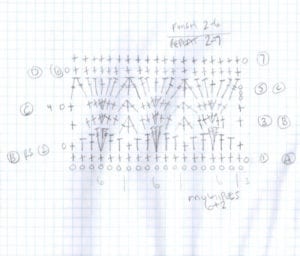
    If you have been following me since the beginning, you know I am a lover of crochet diagrams as it gives me the confidence I need to follow a pattern. In time, I have learned how to do the diagrams on the computer so you don't see my crude hand-drawing as much, though I still do the drawings.
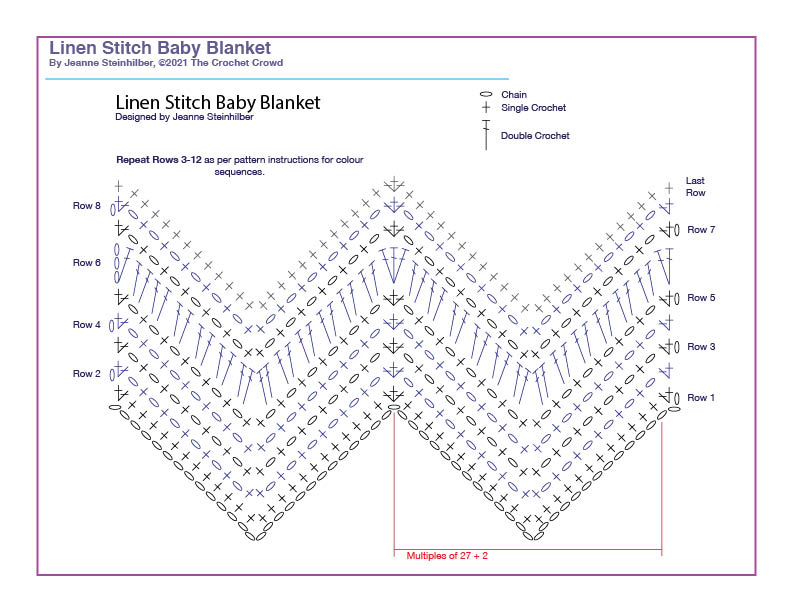
    Little Blue Blanket Feb 2021 Diagram
    Little Blue Blanket Feb 2021 Diagram

    Crochet diagrams by professionals are usually done in Adobe Illustrator. Where we personally build our library of stitches and keep adding the stitches to a master as we go. However, you may be in a position where you don't need to be as meticulous. So while some features in the Stitch Fiddle Version are missing for me from a personal perspective, it has most things you need for success and considering it's free, compared to my $150 fee a month for Adobe, you can probably live with it.

    Stitch Fiddle Crochet Diagram Program

    1. I would highly recommend creating a free account login so you can save your work. Most times, I don't always finish a diagram in 1 sitting and a lot of times, I have to come back to it in the future. A free account means you can save your work.
    2. For those into Tunisian, do you see the Tunisian Symbols? If you don't, they are there if you know them.
    3. You will need to know the meanings of the symbols to play with this. In the example below, I can add on more symbols if I don't see what I want from a pre-selected category.
    4. You will be able to print and even change colours of symbols.
    5. There is a premium version for more bells and whistles. You will have to research that in more detail to determine your seriousness level.
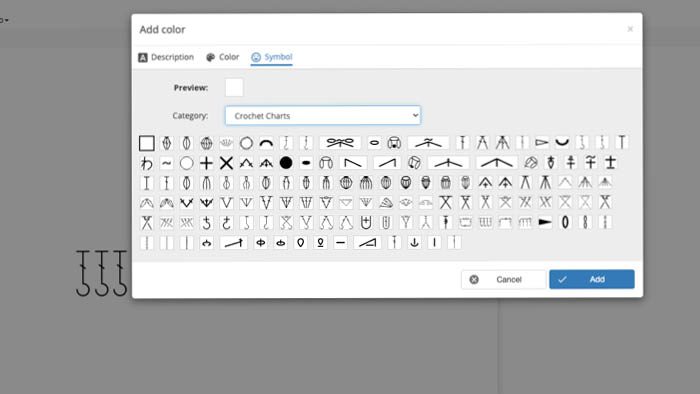
    Crochet Diagram Charts Program
    Crochet Diagram Charts Program

    Speaking bluntly, due to the level at which The Crochet Crowd finds itself, the learning curve for the Adobe Versions that we do today took years to figure out and refine to a standard within ourselves. This type of programming with Stitch Fiddle would have been ideal in the growing stages. So there's something out there and that's great to know.

    More Ideas

    1. Crochet Mountain Mist Afghan Pattern
    2. What Programs to Write Crochet Pattern PDFs?
    3. What Program Do I Use to Make Crochet Diagrams?
    4. Mentorship for Social Media: Part 3
    5. Mentorship for Social Media: Part 4
    Get More Information
    Get More Information: Stitch Fiddle Crochet Diagram Creating

    More Grapghans

    [the_grid name="Graphghans"]

    Like this:

    Like Loading...

    Related

    More Crochet and Knitting Advice

    • Mikey's Preferred Crochet Hooks on Camera and In-Person
    • 12 Slip Stitch Techniques for Double Crochet in the Round
    • How Can You Get Smoke Out of Yarn?
    • Make Your Own Yarn

    Filed Under: Crochet Stitch Library, Intermediate Crochet Patterns, Mikey's Crochet or Knitting Advice

    Comments

      Have you completed this project. Show me! Cancel reply

      Your email address will not be published. Required fields are marked *

      The maximum upload file size: 360 MB. You can upload: image, document. Links to YouTube, Facebook, Twitter and other services inserted in the comment text will be automatically embedded. Drop file here

    1. Pamela Morgan says

      April 06, 2021 at 12:09 am

      You are too hard on your self. I think that not everyone is computer literate. There are many things I can do with my computer but the programming part is my younger son's department.

      Reply
    Mikey Blogging with Pen In Hand

    Welcome!

    I'm Mikey, join me in learning crochet as I am always learning, too!

    More about me
    I Like Crochet Magazine Cover
    Learn more about I Like Crochet Magazine
    • How To Crochet Hugs & Kisses Baby Blanket + Tutorial
    • How To Crochet Granny Bag + Tutorial
    • Free Bernat Crohoodie Crochet Hood & Cowl Combo Pattern + Tutorial
    • How To Crochet Modern Granny Blanket in Many Sizes + Tutorials
    • How To Crochet C2C Beginner Graphghans + Tutorial
    • What Programs to Write Crochet Pattern PDFs?
    • Crochet Study of Variegated Blanket Pattern + Tutorial
    • Crochet Blizzard Snowflake Afghan Pattern + Tutorial
    • Crochet Study of Puffed Dessert Blanket
    • New Warped Tunisian Entrelac Online Workshop + Tutorials
    See more Crochet Stitch Along Patterns →

    Footer

    Stitch Alongs With Mikey

    • How To Crochet Study of Transitions Blanket Pattern + Tutorial
    • The Study of Ombre Crochet Afghan
    • Bernat Study of Reality Crochet Blanket Stitch Along + Tutorial
    • How To Crochet Study of Snow Blanket + Tutorial
    • Study of Snow Days with Hot Chocolate Crochet Blanket Stitch Along + Tutorial
    See more Crochet Stitch Along Patterns →
    ↑ back to top

    Explore

    • About
    • Before 2023
    • 2023 Patterns
    • 2024 Patterns
    • 2025 Patterns
    • 2026 Patterns

    More

    • FAQ
    • Contact
    • Privacy Policy

    The website has been active since 2010. Articles and patterns are reviewed from time to time. Some patterns get updated with newly written instructions, photography and keeping the patterns current.

    Copyright © 2026 The Crochet Crowd • Some links may contain affiliate connections.

    %d